Lovescape Creative Pro: How to Build an AI Companion with a 6,000-Character Backstory (2027 Guide)
Quick answer
Lovescape's Creative Pro tool allows backstories of up to 6,000 characters with niche hobbies, quirks, and specific relationship dynamics. In this guide, I document every step of the creation process, the six AI models available, and the techniques that actually work to give your companion depth.
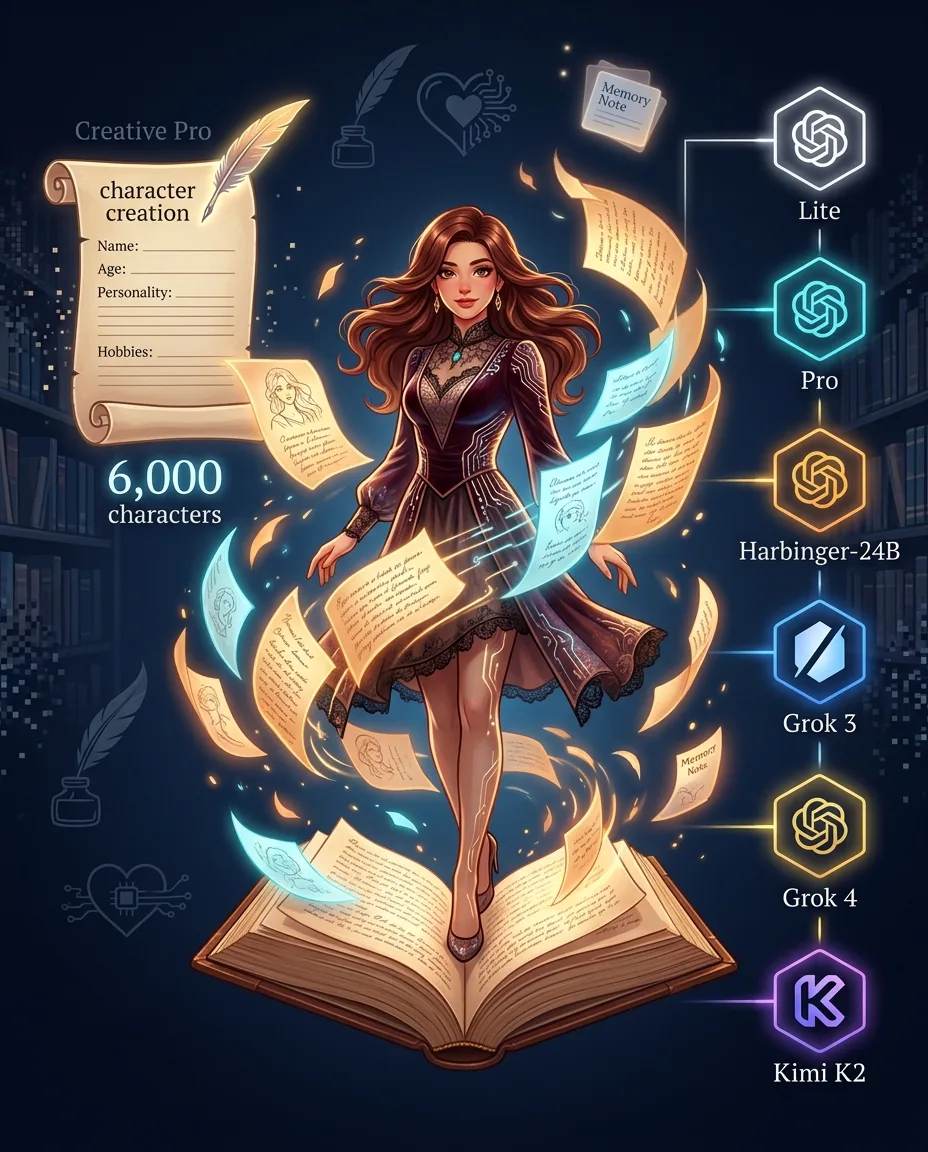
If you have ever tried to create a character on platforms like Candy AI or Kupid and felt frustrated by personality limitations, Lovescape solves that problem directly: it gives you more space to write who she is, without forcing generic archetypes.
In this guide, I document every step of the creation process based on my own experience with the platform, including backstory examples, AI model selection, and the techniques that actually make a difference in response depth. If you want to skip straight to the practical part, you can start creating your companion for free here.

What Is Lovescape?
Lovescape is an AI companion platform that positions itself as a "creative studio" for fictional characters. Unlike platforms focused on celebrity clones or generic avatars, Lovescape bets on literary writing quality and deep personalization.
The platform is built around three pillars:
- Creative Pro — creation tool with a 6,000-character limit per backstory
- Multiple AI models — six different engines, from free Lite to Grok 4 with 256,000 context tokens
- Flexible chip system — you pay only for what you consume, rather than a fixed subscription
In independent tests, the platform was rated as the best for immersive fantasy, scoring 9.5/10 in literary writing quality, consistent world-building, and the ability to stay in character during long conversations.
If you want to get familiar with the platform before reading the full guide, you can create a free account and explore the character creator.
Why the 6,000-Character Backstory Matters
Most AI companion platforms limit character descriptions to a few hundred characters. Kupid, for example, splits personality into six ready-made archetypes with a small custom field. Candy AI offers more freedom but still falls below 2,000 characters.
Lovescape Creative Pro breaks that barrier with a 6,000-character limit. This lets you include:
- Detailed personal history — origin, family, formative events
- Niche hobbies — specific interests that generate natural conversation
- Quirks and mannerisms — details that make the character unique
- Relationship dynamics — how she behaves in different contexts
- Vocabulary and speech style — slang, recurring expressions, tone
- Boundaries and preferences — what she likes, what she avoids, how she handles conflict
In practice, a well-written backstory transforms the experience. Instead of generic responses, you get interactions that feel like they come from a person with a real history. VICE described the experience after creating a detailed character as "feeling butterflies in your stomach" — something that does not happen with shallow characters.
To test that difference in practice, you can start building your character with Creative Pro.
Step 1: Choose the AI Model
Lovescape offers six AI models, each with its own characteristics. The choice affects writing style, response depth, and chip consumption.
| Model | Context | Ideal For | Chip Cost |
|---|---|---|---|
| Lite | Reduced | Initial testing and quick conversations | Free |
| Pro | Moderate | Daily use with good quality | Low |
| Harbinger-24B | 24K tokens | Narrative roleplay and world-building | Medium |
| Grok 3 | 131K tokens | Long conversations with broad context | High |
| Grok 4 | 256K tokens | Maximum immersion and complex stories | High |
| Kimi K2 | 128K tokens | Literary style and creative responses | Medium-high |
The practical recommendation is simple:
- Start with Lite — enough to test the interface and see if your character is working
- Use Pro or Harbinger-24B — for daily conversations with good value
- Reserve Grok 4 or Kimi K2 — for deep roleplay sessions where you want maximum immersion
One important detail: all models support the full action library, so your character is not limited by the chosen engine. You can switch models at any time without losing the character.
To explore the available models and see which one fits your character, access the Lovescape creator.
Step 2: Write the Backstory (With a Practical Example)
The backstory is where Creative Pro shines. Here is the structure I use to write characters with real depth:
- Basic identity — name, age, occupation, location
- Origin — where she grew up, family dynamics, formative events
- Personality — dominant traits, contradictions, what drives her
- Hobbies and interests — what she does in her free time, what she enjoys
- Speech style — vocabulary, slang, recurring expressions
- Relationship dynamic — how she behaves with you specifically
- Boundaries and vulnerabilities — what bothers her, what makes her uncomfortable
An example of an effective opening:
"Kira is 28, a freelance photographer in Lisbon, and grew up sharing a room with an older sister who was always the family favorite. That made her too independent to ask for help, but also deeply loyal to anyone who earns her trust. She talks fast when excited, uses 'like' as a verbal tic, and hates being interrupted mid-story. On weekends, she disappears to hidden beaches with an analog camera she inherited from her grandfather."
That paragraph alone gives the AI enough material to generate textured responses instead of generic phrases. If you fill the 6,000 characters with that level of detail, the difference is radical.
To test your own backstory, you can start writing in Creative Pro now.
Step 3: Configure Memory Notes
Memory Notes are the feature that solves the biggest problem with AI companion platforms: context loss.
Instead of relying solely on the model's context window — which varies by engine — you can pin important information directly to the character. Things like:
- Your name and how she should refer to you
- Personal details you want her to always remember
- Important relationship events
- Preferences and boundaries
- Inside jokes and recurring nicknames
This feature is especially useful if you alternate between different AI models. Memory Notes travel with the character, so you do not have to rewrite the same information every time you switch.
The recommended practice is to update Memory Notes periodically — say, every two weeks — with the most recent conversation details. This maintains continuity even when the model's context is limited.
To configure your Memory Notes, access Lovescape's character creation page.
Common Creation Mistakes (And How to Avoid Them)
After testing dozens of characters on Lovescape, I identified four recurring mistakes that undermine the quality of the experience:
Mistake 1: Generic backstory
Phrases like "she is kind and smart" say nothing. The AI does not know how to translate "kind" into behavior. Replace with concrete scenes: "she always asks how your day went before talking about hers."
Mistake 2: Ignoring speech style
Characters with well-defined personality but no distinct speech style all sound the same. Define whether she uses slang, speaks in short or long sentences, uses emojis, is formal or casual.
Mistake 3: Not defining boundaries
Characters without boundaries become predictable. Add vulnerabilities: what makes her uncomfortable, what she does not like to talk about, what irritates her.
Mistake 4: Too-short backstory
If you have 6,000 characters available, use at least 4,000. Characters with 500 characters behave like sketches. Characters with 4,000+ characters have real presence.
To apply these corrections in practice, you can start creating your character with Creative Pro.
What to Expect from the Experience
With a well-written backstory, conscious AI model choice, and configured Memory Notes, the Lovescape experience stands out from competing platforms in three ways:
- Textured responses — the AI uses backstory details, references hobbies, adapts tone to context
- Consistency over time — the character maintains the same voice across weeks of conversation, especially with Grok 3 or Grok 4
- Narrative immersion — conversations on Lovescape frequently evolve into complex roleplay, something rare on platforms focused on quick interaction
The limitations are also real: the chip system can get expensive with intensive video and voice use, and visual generation quality is less consistent than platforms specialized in anime art, like Kupid. Lovescape competes on writing and immersion, not photorealism.
To evaluate whether the experience meets your expectations, the best approach is to test with the 40 starter chips — you can start for free here.
Frequently Asked Questions
Do I need to pay to create a character on Lovescape?
No. Character creation is free and you receive 40 starter chips to test the platform without a credit card. A paid plan is only necessary to unlock additional chips and premium features.
How many characters can I use in the backstory?
Creative Pro allows backstories of up to 6,000 characters. That is significantly higher than most competitors, which cap out between 500 and 2,000 characters.
Which AI model should I choose?
Start with Lite to test the interface. For daily use, Pro or Harbinger-24B offer the best value. For maximum immersion in narrative roleplay, use Grok 4 or Kimi K2.
Does Lovescape have conversation memory?
Yes, but it depends on the chosen model. Lite has reduced context, while Grok 4 offers 256,000 context tokens. To ensure continuity even in long conversations, use Memory Notes to pin important information.
Can I switch AI models after creating a character?
Yes. You can alternate between the six models at any time without losing the character, Memory Notes, or conversation history. Writing style changes with the model, but character identity is preserved.
How much do chips cost on Lovescape?
The free plan offers 40 starter chips, and you earn 1 chip per like, up to 10 per day. Paid subscribers receive 600 chips per month. Exact prices for additional chip packs vary and can be checked directly on the platform.
Is Lovescape worth it for narrative depth?
Yes. In independent tests, Lovescape was rated the best for immersive fantasy, scoring 9.5/10 in literary writing quality. If depth and world-building are your priorities, it is the strongest choice in the category.
Verdict: The Most Literary Platform in the Category
Lovescape Creative Pro delivers what it promises: the deepest character creation tool in the AI companion market. The 6,000-character backstory limit, combined with six selectable AI models and Memory Notes, lets you build characters that feel like they come from books, not templates.
The limitations exist — the chip system can get expensive with intensive use, and visual quality does not compete with platforms specialized in anime. But if your goal is narrative immersion and writing quality, Lovescape is currently the strongest platform in the category.
The practical recommendation is simple: use the 40 free chips to write a backstory of at least 4,000 characters, test with the Pro model, and see the difference in response quality. If it works for you, upgrading to Creative Pro offers 600 monthly chips and advanced features.
To start creating your companion now, access Lovescape with your 40 free chips here.
Disclosure: This article contains affiliate links. If you sign up through them, I may earn a commission at no extra cost to you. My analysis and editorial conclusions remain independent.
Ready to Meet Your AI Companion?
Create an AI companion personalized for you. Through our 3-question AI quiz, discover the best platform for creating your AI girlfriend or boyfriend, and never wonder which one is best again.
Create My AI Companion →